
Who can use this feature: Accounts on any plan using Kobas Payments.
Jump to:
Introduction
By default, you will have a SIM card installed on each terminal when it is shipped to you. The device will always try to use Wifi so that you can take integrated payments. However, if your internet goes down, it will failover to the SIM service to allow your business to continue.
If however, you chose not to have the cost of a SIM card per device, you can add that later. This guide shows how to install and activate the SIM.
Delivery
You will receive the SIM cards in the post to the venue.
Install
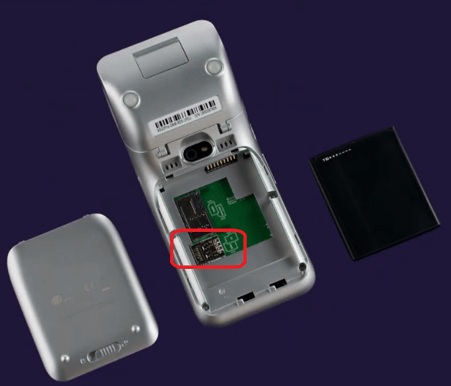
Remove the back cover and battery, and locate the SIM card slot. Insert the SIM card firmly. Reconnect the battery and pop the cover back in place.
Activate
Go to the standalone app, go to Menu > Celluar Settings > APN and enter the details from the guide that came with your SIM card.